
Turck RFID–TwinCAT ADS Bridge: forwarding EPC data to a PLC
This project connects a Turck PD67-UNI handheld RFID reader to a Beckhoff TwinCAT controller. The reader application sends tag data to the bridge over HTTP, and the desktop application forwards it to the PLC through TwinCAT ADS.
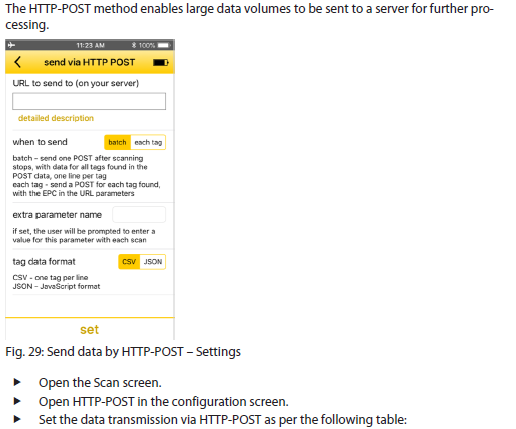
From a scanned tag to PLC variables
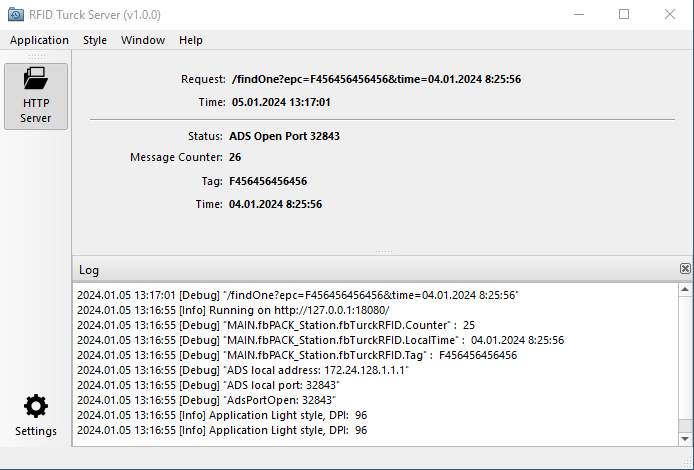
The reader sends a request to the /findOne endpoint on TCP port 18080. The epc and timestamp query parameters carry the tag identifier and scan time. The application displays the received request and values, then writes them to the configured PLC symbols:
MAIN.fbSCAN_Station.fbTurckRFID.Tag— tag EPC,MAIN.fbSCAN_Station.fbTurckRFID.LocalTime— scan time,MAIN.fbSCAN_Station.fbTurckRFID.Counter— processed-request counter.
After processing the request, the bridge returns a response indicating which fields were stored, or an ADS error code. The main window shows ADS status, message count, the latest tag and timestamp, and the application log:
Example destination URL for the reader application:
http://<bridge-address>:18080/findOne?epc=<EPC>×tamp=<time>
The reader's HTTP-POST configuration and value format must match the bridge setup.
Configuration and startup
A 64-bit Windows build with the required Qt and ADS libraries is included in bin/MSVC2019_64/. Run TurckRfid.exe on a host with network access to both the reader and the TwinCAT ADS router.
The ADS router address and PLC symbol names are currently hard-coded in TcADS/twincatads.cpp; they are not configurable through the settings dialog. Update them to match the target TwinCAT project before deployment. On startup, the application initializes Tag and LocalTime to zero, while it reads the current Counter from the PLC.
The source project uses C++17, Qt 6 including the HTTP Server module, qmake, and the Beckhoff ADS library. To build it, open TurckRfid.pro in Qt Creator and select a 64-bit MSVC 2019 kit with the required Qt modules.
Security: The HTTP server listens on all network interfaces on port
18080, and the project does not implement request authentication. Restrict access to a trusted OT network and firewall rules; do not expose the endpoint to untrusted networks. Verify the ADS address, symbol names, and startup initialization on a test PLC before connecting to production equipment.
Source code: CodElecCz/turck-rfid-twincat-bridge.