
Protocol Tracer: Industrial Protocol Diagnostics and Monitoring
Protocol Tracer (TracerUI) is a desktop application written in C++ using Qt 5.14.2. It cyclically monitors and controls device values, presenting communication tasks, data areas, and individual variables in an editable tree. It supports Modbus, OMC8000, and ELM327, with settings loaded from XML profiles.
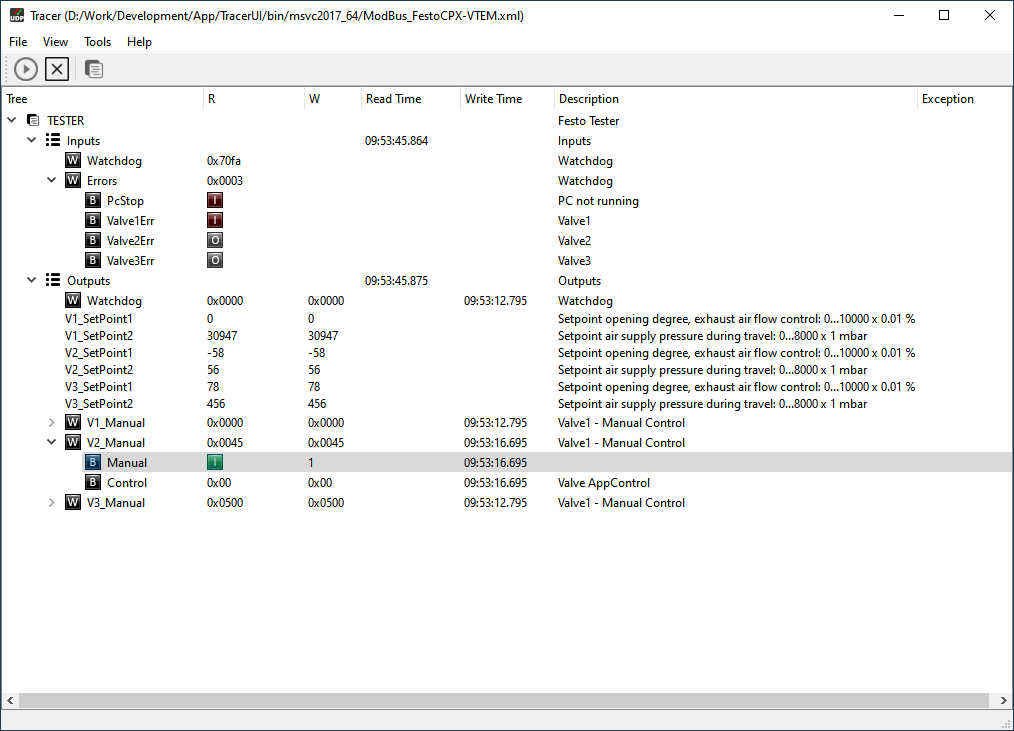
Real-time value monitoring
After an XML profile is loaded, the application displays its tasks and data areas. The table shows read and write values, read/write timestamps, descriptions, and status indicators. Tasks can be started and stopped from the toolbar. Values that the profile permits writing can be edited in the W column.
Protocol Tracer is not intended for passive sniffing of raw packets. It cyclically reads and displays variables defined in the profile, along with their status and any communication errors.
Supported protocols and profiles
- Modbus — communication over serial or Ethernet; areas specify the data type, address, number of values, and read/write access.
- OMC8000 — communication over serial or network connections.
- ELM327 — serial communication using variables defined in the profile.
An XML profile describes tasks, data areas, and individual variables. Each task specifies its connection and polling interval, each area defines its data type and access permissions, and each variable has a type, offset, and description. The root XML element (modbus, omc8000, or elm327) selects the corresponding application model.
Run the application
A 64-bit Windows build is included in bin/msvc2017_64/. Start TracerUI.exe and load a suitable XML profile using File → Open. Before starting tasks, check and adjust the communication settings and addresses for your test setup.
The project is built with qmake. For the 64-bit version, open TracerUI_64.pro in Qt Creator and select a 64-bit MSVC 2017 kit with Qt 5.14.2. The XML configuration format is described in TracerUI.txt.
⚠️ Safety warning: Writing through the W column can change values on the connected device. Before starting, verify address mappings and access permissions, and make sure you are using the intended test device.
Source code: CodElecCz/protocol-tracer.